

Accessible mode
Moiki offers an accessible mode, meant to make reading more comfortable, in particular for readers with dyslexia or with visual fatigue.
Turning it on
Section titled “Turning it on”Open the menu, at the bottom left of the screen, then Settings. Switch Accessible mode on.
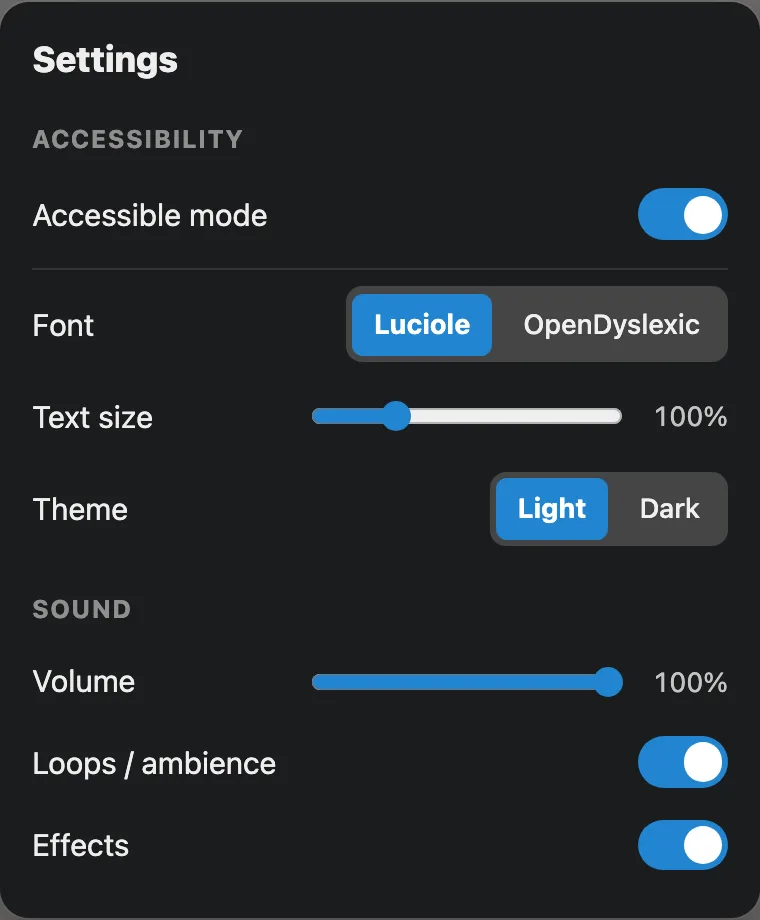
Accessible mode, once on, brings out three comfort settings.

Reading in accessible mode: a single column, a font made for it.
What it changes
Section titled “What it changes”Once it is on, accessible mode:
- lays the reading out in a single column, simpler to follow,
- uses a font designed for reading, either Luciole or OpenDyslexic,
- removes animations,
- removes backgrounds, images and videos alike, to keep the text alone,
- stops timers, so no choice puts you under pressure any more,
- clearly marks the element selected with the keyboard,
- announces every new sequence to screen readers,
- lets you set the Theme (light or dark) and the Text size.
From one story to the next
Section titled “From one story to the next”Your preference is kept, so you only need to turn it on once.