

A reading workshop
In a reading workshop, your students play an interactive story you hand them. It is the easiest activity to launch: you pick a story, the class works through it, and you see exactly which way each of them went.
This guide follows the workshop in the order you will live it, from preparation to the feedback in class.
The run, at a glance
Section titled “The run, at a glance”| Step | Who | What happens |
|---|---|---|
| 1. Prepare | You | You create the workshop and place the story to read in it. |
| 2. Launch | You | You launch the session for a class. |
| 3. Read | The students | Each one plays the story, at their own pace, and makes their own choices. |
| 4. Track | You | You see how far each one has got, then the path they took. |
| 5. Back in class | You | You project the class analytics to discuss the choices. |
1. Prepare the workshop
Section titled “1. Prepare the workshop”From Workshops, create a workshop and choose the Reading type. Give it a name: the workshop is created, still Incomplete.
It needs its story to read. In the Stories block, the Add button offers two ways:
- Create from a template, to write a new story,
- Pick one of my stories, to reuse a story you already have.
You can also start from a ready-made workshop: the catalog offers some, to import with their stories. See The catalog.
Then fill in the description, the objectives and the instructions. Students read them before they start. See Create and fill in a workshop.
2. Launch the session
Section titled “2. Launch the session”Once the workshop is Ready to launch, Launch a session asks you for a class and, if you want them, dates. The session goes straight to In progress, and students find the workshop in My workshops. The shared mechanics are described in Launch and track a session.
3. While the students read
Section titled “3. While the students read”Each student plays the story in the player, like any reader. They can stop and resume later: their progress is kept. What students see is described in Resuming my work.
On your side, the session page updates as the readings go.
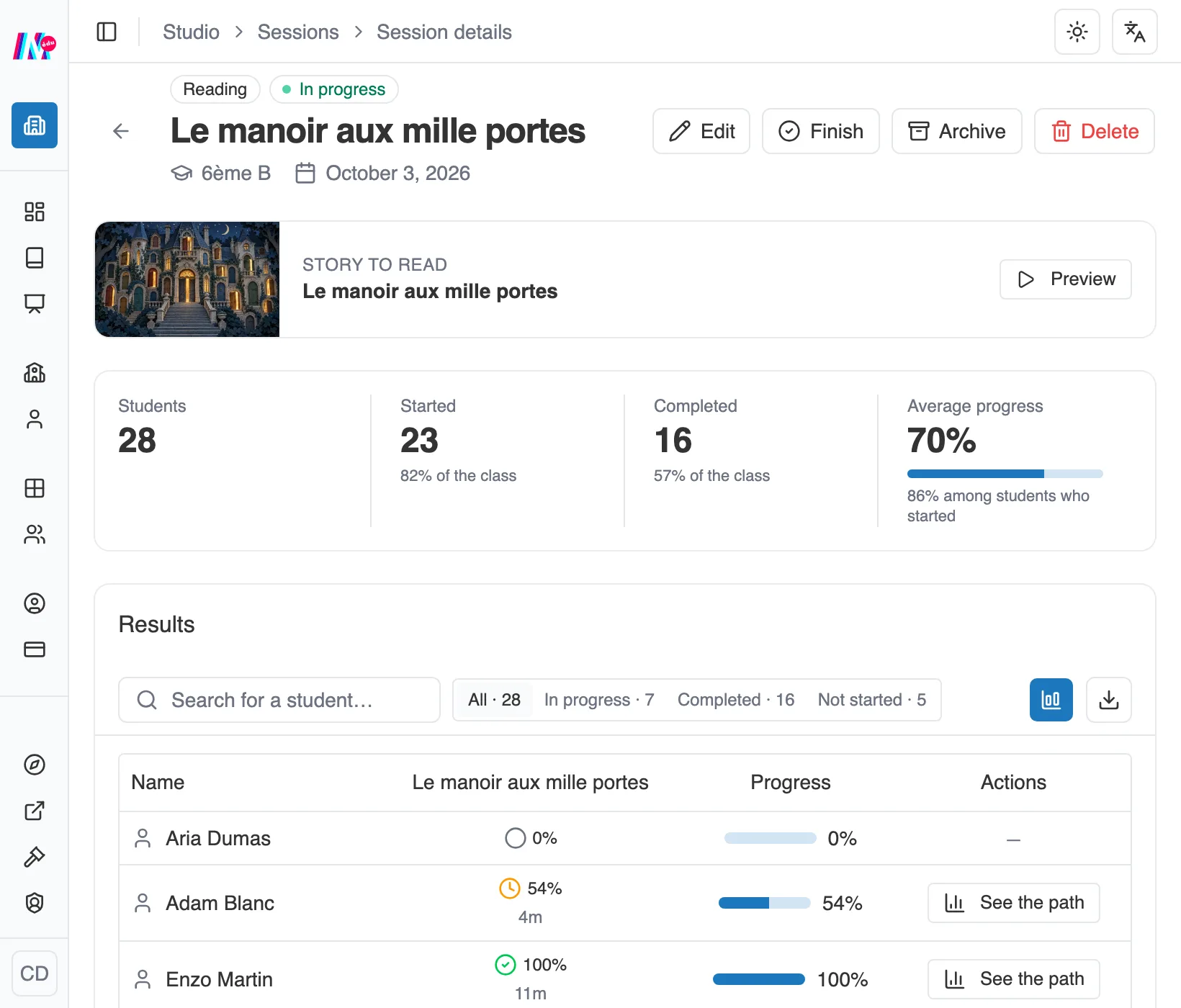
The reading session: the class figures, then one row per student.
At the top, four figures, and each one says who it covers:
- Students, the size of the class,
- Started and Completed, with their share of the class,
- Average progress, computed over the whole class, with underneath the average of only the students who started.
The Results table then gives, for each student, their progress and the time spent. The In progress, Completed and Not started counters filter the list in one click, handy to spot those who have not begun. Export (CSV) turns it into a file.
4. One student’s journey
Section titled “4. One student’s journey”This is what reading workshops are made for. On a student’s row, See the path opens their route, step by step.
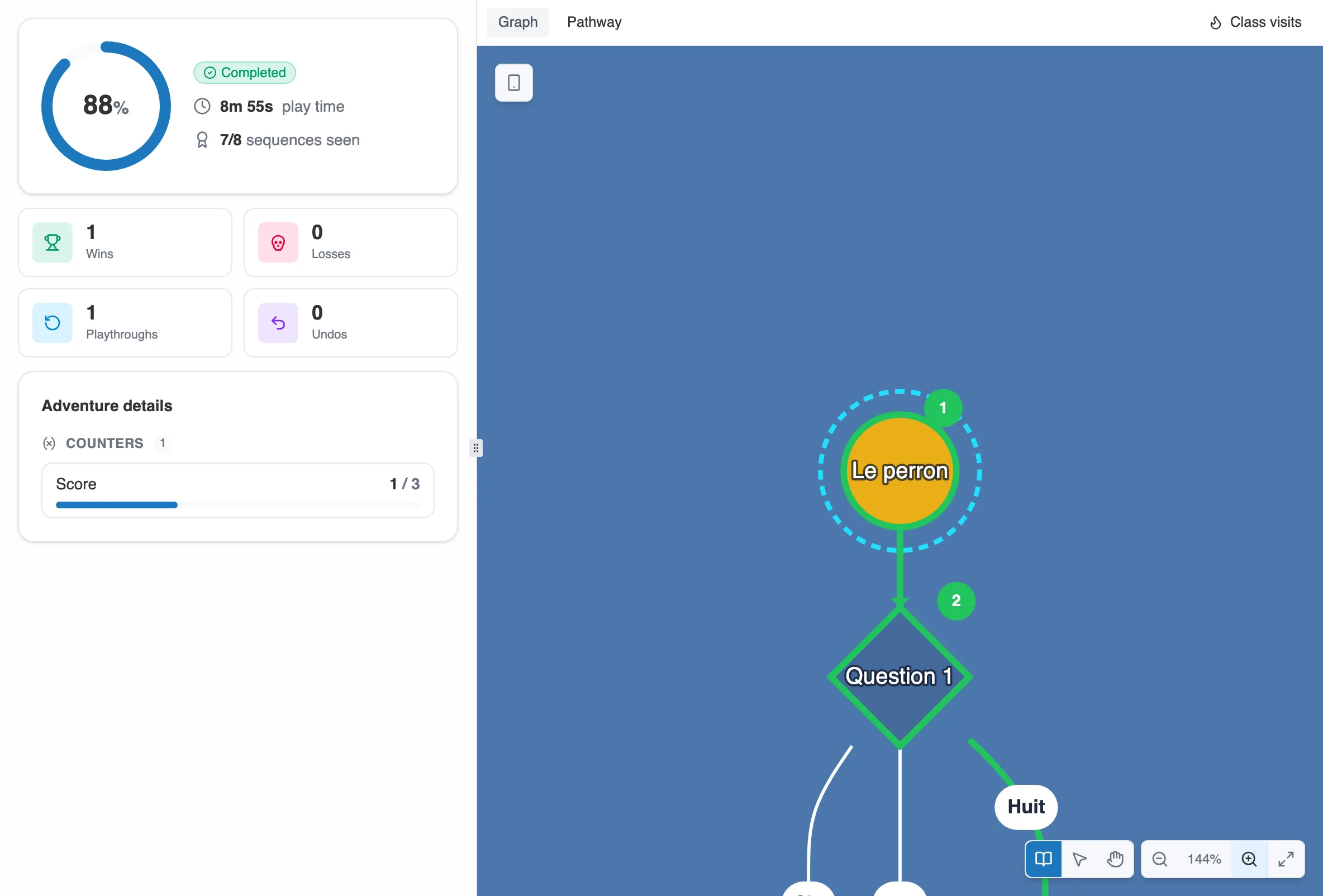
On the left what the student did, on the right the path they took.
The left panel sums up their reading: their progress, the play time, the sequences seen, then their wins, losses, playthroughs and undos. A win is a happy ending reached, a loss a tragic ending, and playthroughs count how many times they started the story. Adventure details adds the counters of the story, where they left them.
The right panel has two tabs.
Graph highlights their path on the graph of the story, each step carrying its number. The Class visits button lays the heat map of the whole class over it, to see at a glance whether the student went with the flow or took a path of their own.
Journey lays out the steps in the order they were played. Each one carries its number, the sequence crossed and the choice taken. A sign on the row says what it was: a choice, an item, a code, an entry, or a timer running out. Click a step, and the preview shows the sequence as the student saw it.
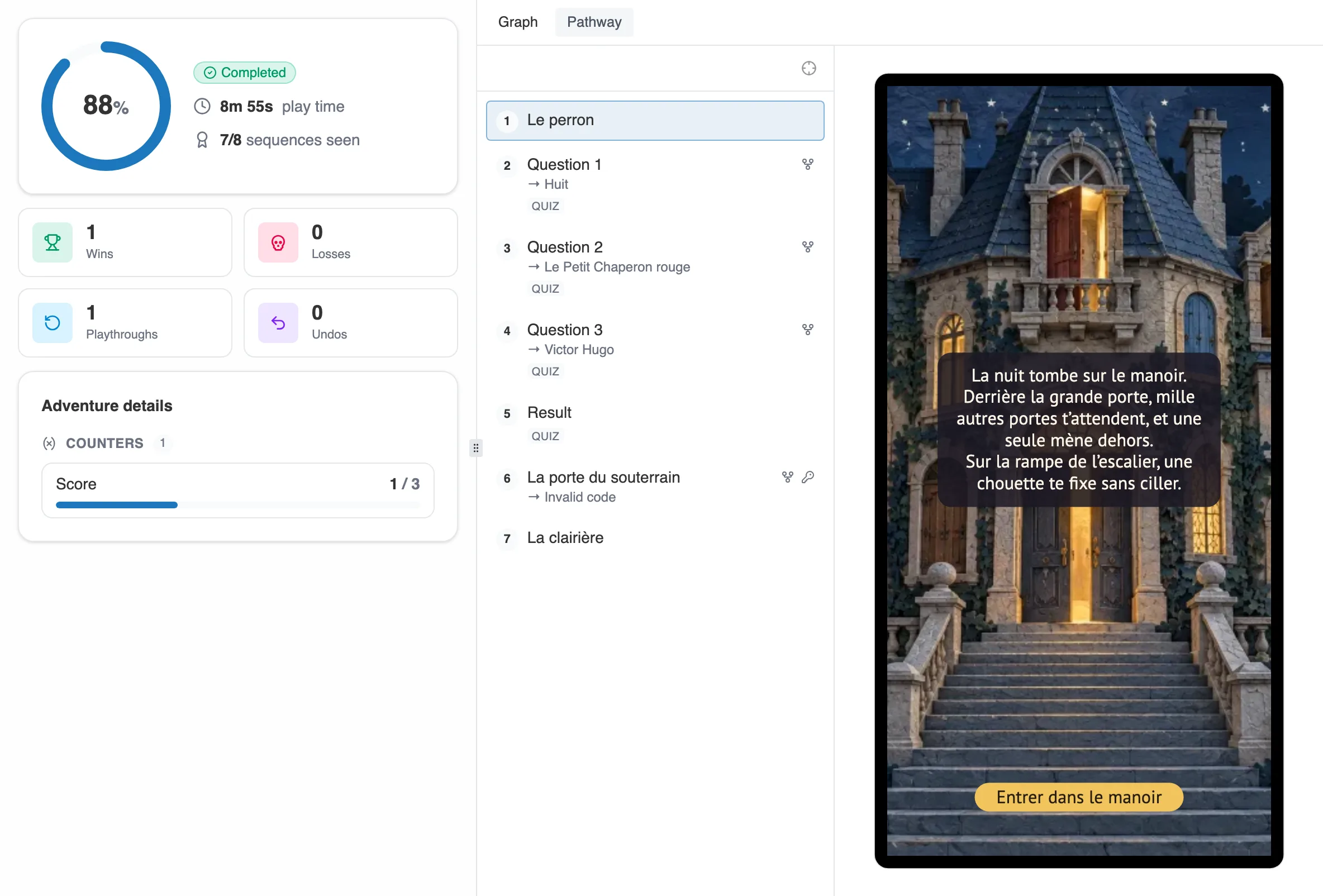
The Journey tab: the steps in order, and the preview of the one you select.
5. Back in class with the analytics
Section titled “5. Back in class with the analytics”Above the table, the Class analytics button aggregates every journey. The screen has two tabs.
Overview
Section titled “Overview”A heat map colors the graph, from the least taken to the most taken. On the left, the number of playthroughs, how many are finished, the average time, and the Ending breakdown.
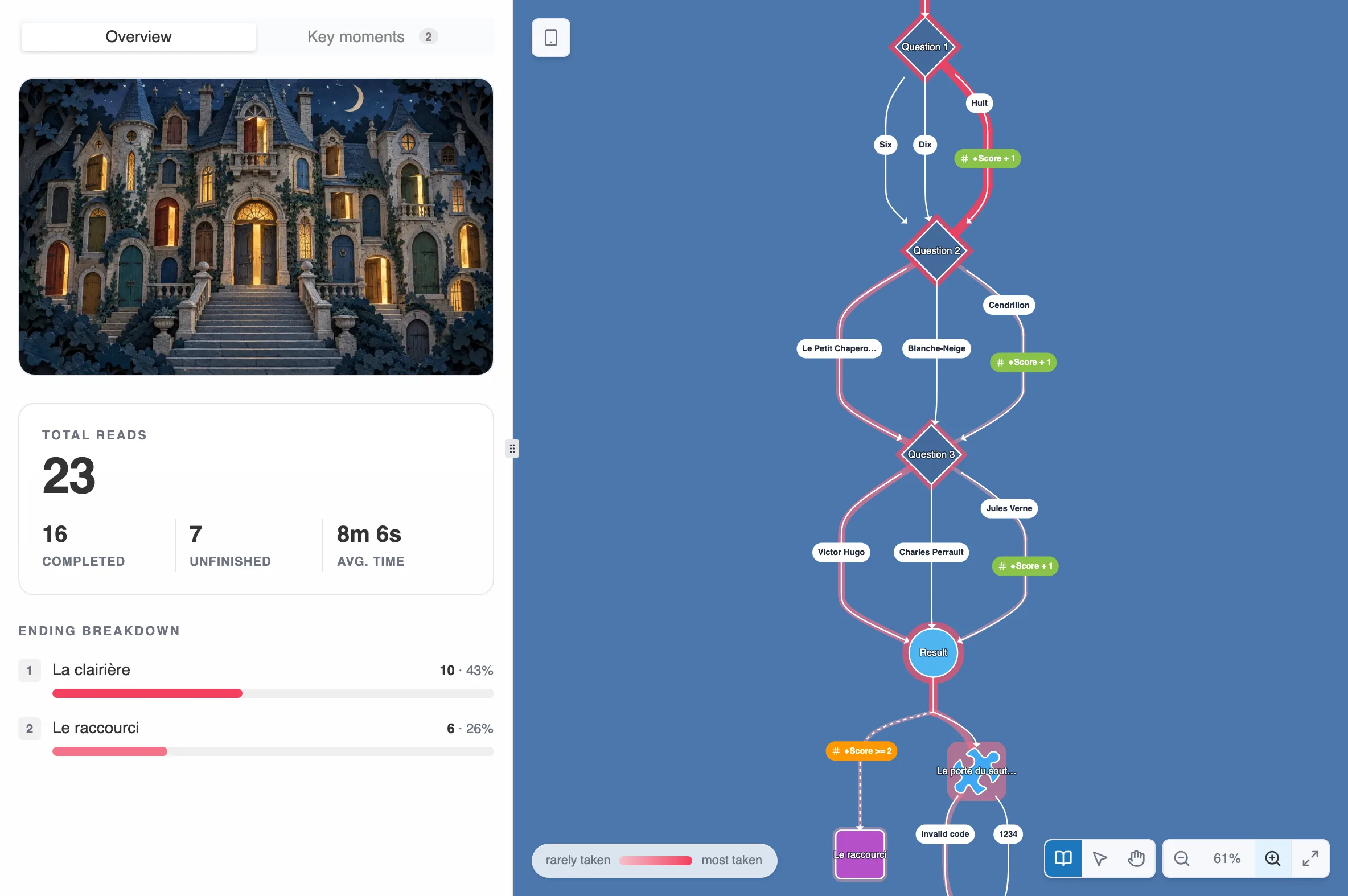
The overview: the paths most taken, and the ending breakdown.
Two things are worth knowing when you read it.
A connection can announce one destination and reach another depending on the playthrough, as happens with a quiz exit that routes on the score. The breakdown therefore counts one row per actual arrival, and not one per connection. Each branch carries its own count, and the shared trunk keeps the total.
The percentages always say what they cover. The overall rate comes first, and the local share reads underneath, naming its population, along the lines of “30% of those who came here”.
Key moments
Section titled “Key moments”This tab goes looking for you where the group split the most. It shows one branching at a time: the sequence as students saw it, the number of players who came through, and the share of each choice. The arrows scroll through the branchings, and the closest split tag marks the one where opinions divided the most.
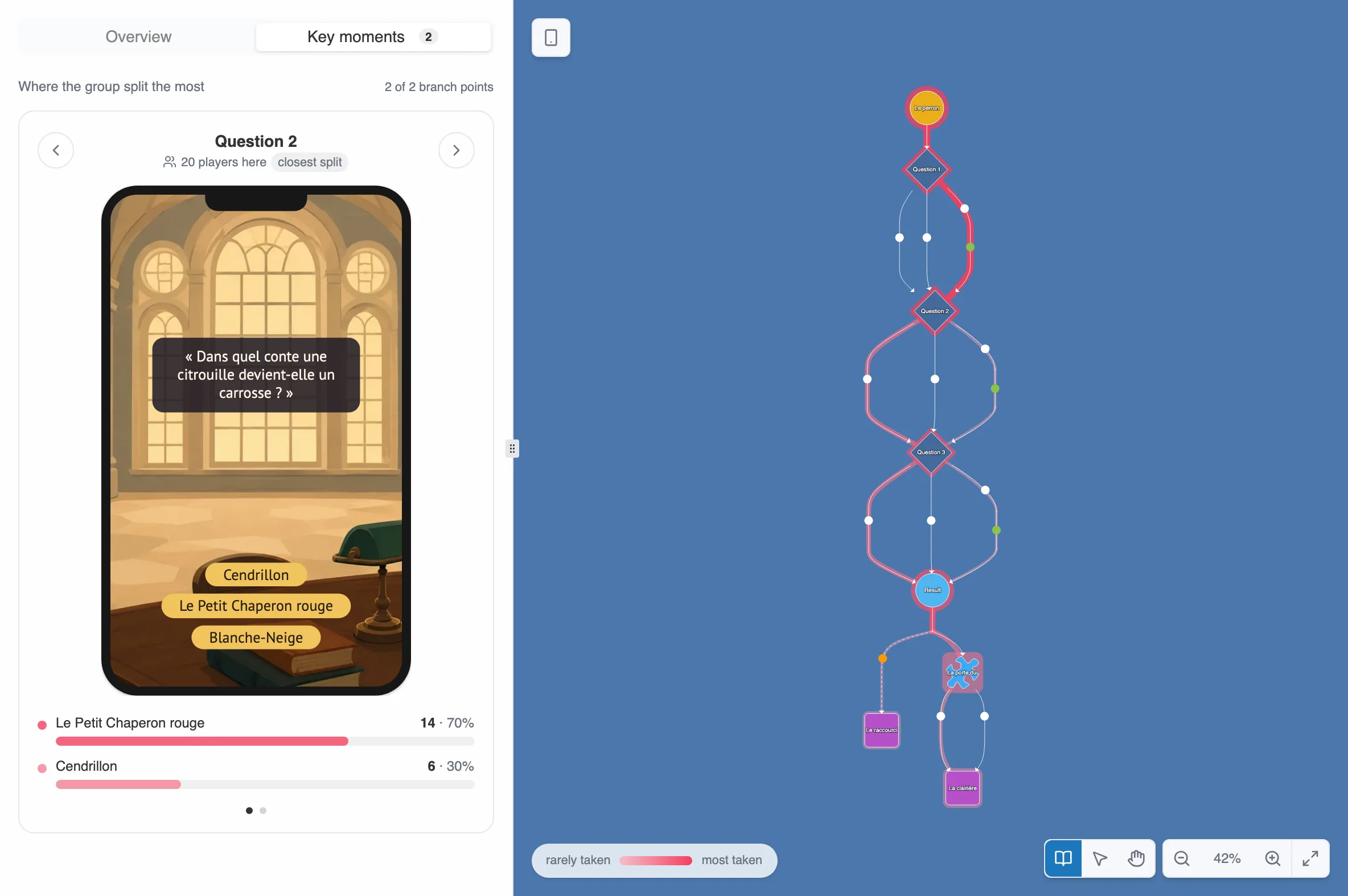
A key moment: the question asked, and what the class answered.
As long as too few playthroughs have been played, or the choices do not split enough, the tab says there are no decisive moments yet.
A few pointers for the lesson
Section titled “A few pointers for the lesson”These pointers come from the way the tool works, not from an imposed method.
- Play the story before the class does. You will know its length, its endings, and the places where a student can get stuck.
- Check sign-ins before the day. Every student must be able to sign in. See Pupils or students: how they join your space.
- Set dates if the reading must fit in a slot. Outside the window, students can no longer play.
- Keep an eye on “Not started”. The filter isolates in one click those who have not begun.
- Project the key moments. A branching where the class split in two is a ready-made question: why this choice rather than the other?