

Rich text
Text is the heart of a sequence. You write it in the TEXT block, at the top of its panel, with a small toolbar to format it.
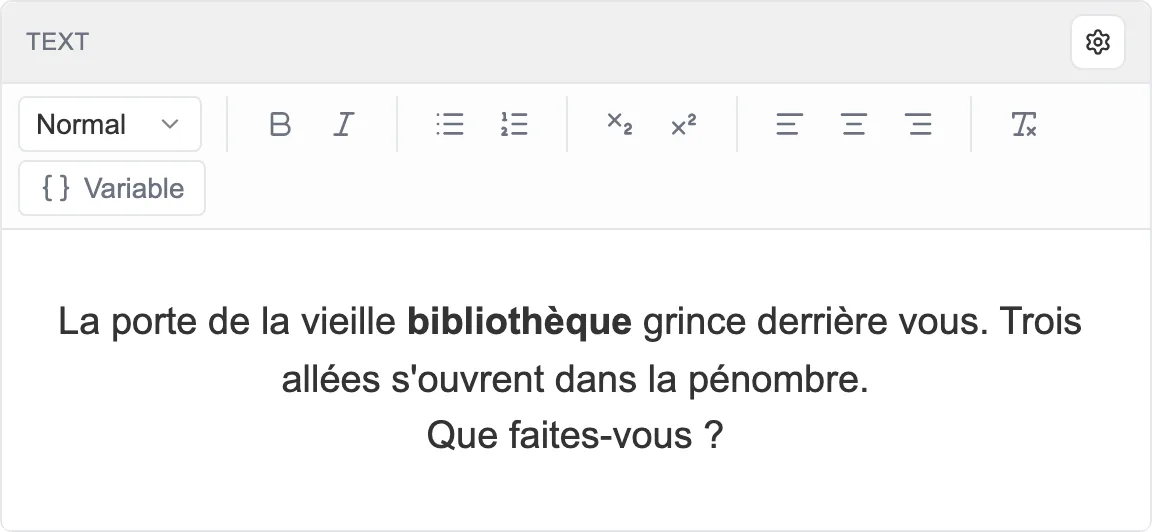
The TEXT block: the toolbar on top, the text below.
Formatting
Section titled “Formatting”The toolbar covers the essentials, from left to right:
- The Normal menu picks the paragraph style: body text, Heading 1 or Heading 2.
- Bold and Italic.
- A List and a Numbered list.
- Subscript and Superscript, for small notations.
- Text alignment: left, centered, right.
- Clear formatting, to start again from clean text.
Inserting a variable
Section titled “Inserting a variable”The Variable button, on the right of the bar, drops the value of a variable into the flow of the text, the name of your hero or a number of points for instance. See Inserting a variable into the text.
A sequence without text
Section titled “A sequence without text”Some sequences have no need for text, a simple junction for example. The cogwheel menu at the top of the block then offers Set as text-free sequence.